Astro’s content collections are awesome!
They provide:
- Type safety with Zod schemas
- Automatic routing
- Markdown support out of the box
Why I love Astro
- Fast – it ships zero JavaScript by default
- Flexible – you can add React, Vue, Svelte, etc.
- Content‑focused – perfect for blogs and documentation
Quick code example
const greeting = "Hello from Astro!";
console.log(greeting);
Heading 1
Heading 2
Heading 3
Heading 4
Heading 5
Heading 6
Tables
==== ⚙️ Key Factors That Determine if Data Will Be Lost====
| Factor |DescriptionDescription |Recommendation |
| Factor | DescriptionDescription | Recommendation |
|---|---|---|
| Server concurrency | Next.js (Node.js) can handle many concurrent requests, but DB writes can be the bottleneck. | Ensure your API handler is asynchronous and non-blocking. |
| Name | Age | Occupation |
|---|---|---|
| John Doe | 30 | Engineer |
| Jane Smith | 28 | Designer |
| Bob Johnson | 35 | Developer |
Paragraphs
This is a regular paragraph with bold text, italic text, bold and italic, and inline code.
Here’s another paragraph with a link to Google.
Blockquotes
This is a blockquote. It can span multiple lines.
And can be nested!
Lists
Unordered List
- Item 1
- Item 2
- Nested item 2.1
- Nested item 2.2
- Item 3
Ordered List
- First item
- Second item
- Nested item 2.1
- Nested item 2.2
- Third item
Task List
- Completed task
- Incomplete task
- Another task
Code
Inline Code
Use console.log() to print to the console.
Code Blocks
[ESP-01 x100+] → [Gateway/Server] → [Next.js API] → [MySQL] → [WebApp]
// JavaScript example
function greet(name) {
  console.log(`Hello, ${name}!`);
}

greet("World");
# Python example
def greet(name):
print(f"Hello, {name}!")
greet("World")# Bash example
echo "Hello World"
ls -la<!-- HTML example -->
<div class="container">
<h1>Hello World</h1>
</div>/* CSS example */
.container {
max-width: 1200px;
margin: 0 auto;
padding: 20px;
}{
"name": "Astro",
"version": "4.0.0",
"type": "framework"
}Tables
| Name | Age | Occupation |
|---|---|---|
| John Doe | 30 | Engineer |
| Jane Smith | 28 | Designer |
| Bob Johnson | 35 | Developer |
| Left | Center | Right |
|---|---|---|
| Left | Center | Right |
| 1 | 2 | 3 |
Images
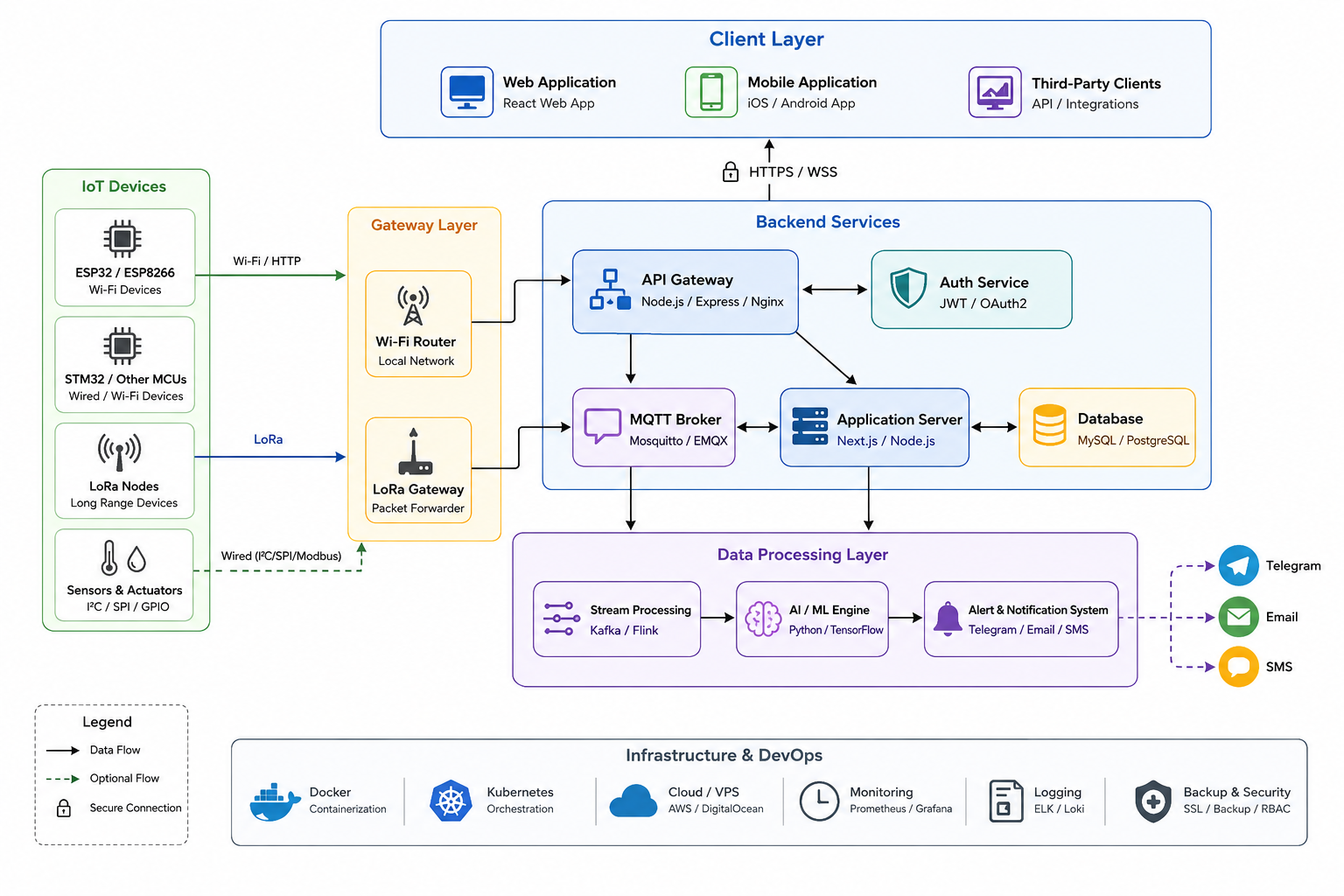
System Architecture Diagram
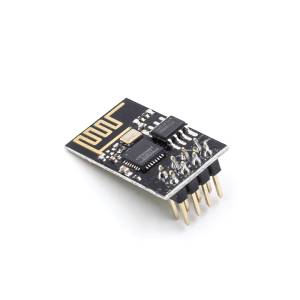
ESP-01 (blue board)
ESP-01S (black board)
ESP-01 Modules
Here are the different ESP-01 modules available:
ESP-01 (blue board)
ESP-01S (black board)
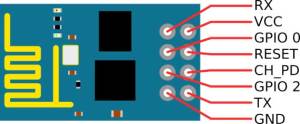
Connection Diagram
The ESP-01 requires to be connected to a USB-to-Serial adapter.
| Left | Center | Right |
|---|---|---|
| | |
1 Solution 1: Centered Images with Flexbox
2 Solution 2: Fixed Height with Centered Images
2a 📐 Fixed Height with Centered Images & Captions
ESP-01 (v1)
ESP-01 (v2)
ESP-01 (v3)
2b Option A: Bold Captions
ESP-01
Original version
ESP-01S
Improved version
ESP-01
Blue PCB variant
2c Option B: Caption with Badge
ESP-01
ESP-01S
ESP-01
2d Option C: Caption with Icons
📟 ESP-01 (v1)
📟 ESP-01S (v2)
📟 ESP-01 (v3)
3 🖼️ Solution 3: Square Container (1:1) with Centered Images
4 🎨 Solution 4: With Grid Place Content (Even Better Centering)
5 📱 Solution 5: Variable Height, Perfect Centering
ESP-01
Original version
test 101
10
11 ✅ Simple Solution: Add inline Class
12
13 OK 🎨 With Spacing (Like DokuWiki)
14 OK 📦 Using a Container for Alignment
15
16
16
17
18
19 ✅ Simplest Inline Images
20 🎨 With Container Width Control
21
22 ✅ Fixed Container Size (Same Height & Width)
22 OK
23 OK 🎨 With Captions
ESP-01 v1
ESP-01 v2
ESP-01 v3
24 📐 Flexible Container Height (Same Width, Different Heights)
Horizontal Rules
Emphasis
- Bold or Bold
- Italic or Italic
- Bold and Italic or Bold and Italic
Strikethrough
Links
Footnotes
Here’s a sentence with a footnote.1
Here’s another footnote.2
Definitions
Term : Definition of the term
Another Term : Definition of another term
Abbreviations
*[HTML]: HyperText Markup Language *[CSS]: Cascading Style Sheets
HTML and CSS are fundamental web technologies.
Emojis
😀 🎉 🚀 💻 🔥 ⭐ 🎯 📝 ✅ ❌
:smile: :rocket: :fire: :star: :tada:
Special Characters
© ® ™ € £ ¥ § ¶
Escaping Characters
*This is not italic*
_This is not underline_
# This is not a heading
Combined Examples
With Bold and Italic
Important: This is a critical section with
codeand links.
With Lists and Code
-
First step
- Sub-step with
code - Another sub-step
- Sub-step with
-
Second step
npm install astro -
Third step
Long Form Content
Sample Article
Lorem ipsum dolor sit amet, consectetur adipiscing elit. Sed do eiusmod tempor incididunt ut labore et dolore magna aliqua. Ut enim ad minim veniam, quis nostrud exercitation ullamco laboris.
“The only way to do great work is to love what you do.” - Steve Jobs
Nisi ut aliquip ex ea commodo consequat. Duis aute irure dolor in reprehenderit in voluptate velit esse cillum dolore eu fugiat nulla pariatur.
// Code with explanation
const astro = {
  name: "Astro",
  features: ["Fast", "Flexible", "Content-focused"]
};
Excepteur sint occaecat cupidatat non proident, sunt in culpa qui officia deserunt mollit anim id est laborum.
Mixed Content
Code and Lists
Here are some useful commands:
# List files
ls -la

# Show current directory
pwd

# Create a new directory
mkdir new-folder
And here’s what they do:
ls -la- Lists all files with detailspwd- Shows current working directorymkdir- Creates a new directory
Blockquotes with Lists
Featured Topics
- Topic 1: Introduction
- Topic 2: Getting Started
- Topic 3: Advanced Topics
Learn more about these topics in the documentation.
Headers with Code
npm Commands
git Commands
docker Commands
Final Section
This test file covers:
- Headings (H1-H6)
- Paragraphs
- Bold, italic, strikethrough
- Lists (ordered, unordered, tasks)
- Links
- Images
- Code blocks (inline and fenced)
- Blockquotes
- Tables
- Horizontal rules
- Footnotes
- Emojis
- Special characters
- Mixed content
Created: June 19, 2024
Purpose: Markdown feature testing for Astro blog
## How to use:

1. Save this as `app/src/content/posts/markdown-test.md`
2. Visit `http://localhost:4321/posts/markdown-test`
3. Check how each element renders

## Expected rendering:

- All headings should display correctly
- Bold/italic/strikethrough should be styled
- Code blocks should have syntax highlighting
- Lists should be properly indented
- Tables should be formatted
- Blockquotes should be styled
- Images should load from picsum.photos
- Emojis should render
- Links should be clickable

This will help you verify your Astro blog's Markdown rendering!